

Preview Is Not Live: Deploy Your AI App Properly

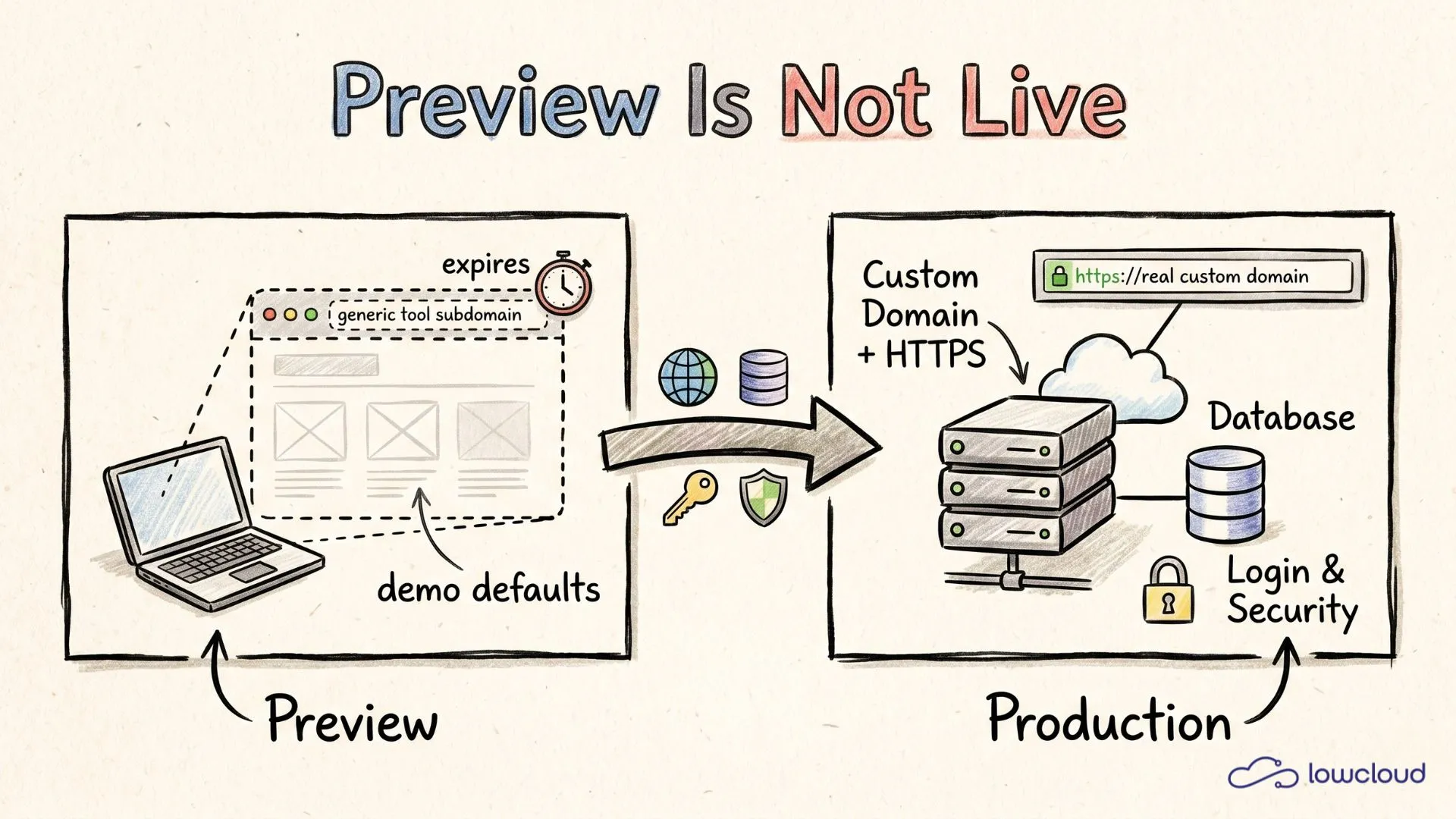
You built an app in Lovable, Bolt or v0, the preview link runs, you share it around and think you are done. Then the tab closes, a friend clicks the link the next day, and the login hangs or the page is dead. That is not a bug in your app. That is the difference between preview and production, and almost every builder hits this wall exactly once.
The short version: the preview is a temporary view on your build tool's servers, not real hosting. "Going live" means something different, namely a custom domain, persistent data, real login, stable API keys and basic security. This post shows you what exactly sits between preview and live, and how to make that step in minutes instead of letting it turn into a weekend project.
Key takeaways
- The preview link is a temporary view on the build tool's infrastructure. It can expire, get throttled, or rely on demo defaults that do not exist in production.
- 85% of broken Lovable apps in production fail on exactly three things: missing environment variables (55%), disabled database security (30%) and login redirects pointing at localhost (15%) (Afterbuild Labs, 2026).
- "Going live" means five things at once: a custom domain with HTTPS, a persistent database, a real auth provider, production API keys as environment variables and protected endpoints.
- A custom domain is not a cosmetic step. Login redirects, cookies, trust and discoverability all depend on it.
What is a preview link, really?
A preview link is the auto-generated URL of your build tool that points at its own infrastructure. Lovable, Bolt and the rest offer it so you can share what you just built in seconds. Handy for showing off, but not made for running.
The decisive part happens under the hood. The preview environment is a managed sandbox that silently fills in things your real host will not: a working database URL, auto-wired auth callbacks and permissive default security (Afterbuild Labs, 2026). That is why everything works in preview. It works because the tool plugs the gaps for you.
On top of that, preview hosting on a tool subdomain is optimized for previews and prototypes, not real traffic. It lacks autoscaling, persistent backend infrastructure and production-grade security configuration (Lovable Docs, 2026). The link can fall asleep after a while, cold starts make it slow, and it has no address of its own anyway.
Keep the sentence like this: the preview proves your idea works. It does not prove someone can use it. That is a different proof, and for that one you need production.
Why is the preview not enough for real hosting?
Because in preview everything runs on demo defaults, while production runs on real, separated values. The things that were never a problem locally break exactly in that translation. It is almost always the same pattern: something that was an automatic step in the build tool now has to be set by you.
The numbers are surprisingly clear. Among broken Lovable apps in production, 85% of cases fall on three causes: in 55% the environment variables were not carried over to production, in 30% the database security (Row-Level Security in Supabase) was disabled, and in 15% the OAuth redirect URLs still pointed at localhost (Afterbuild Labs, 2026). Add missing SSL for the custom domain and webhooks still pointing at the preview URL, and over 90% of deployment failures are covered.
There is a deeper reason. AI tools are optimized for a fast start, not for production hardening. When an agent writes an API key or a database connection, it likes to drop the value straight into the code so the example runs right away (Modall, 2026). In preview that does not matter. In production it is an open door. This is also the point where the typical vibe coding deployment problems show up for the first time.
What changes when you go live: five things
Going from preview to production turns silent placeholders into real systems. Five building blocks need active setup, because the build tool invented them for you in the preview.
Data
In preview a throwaway or demo database is fine, one you can fully reset while building. In production data is sacred, destructive workflows fall away, and schema changes get much harder once real user data is inside (Convex, 2026). You need a persistent, backed-up database, not a SQLite file that will not survive concurrent writes.
Login and auth
In preview the tool wires the auth callbacks automatically. In production the redirect has to point at your real domain, no longer at localhost. That is exactly the 15% cause from above. A login that ran flawlessly in preview hangs under your domain until you update the redirect URLs.
Backend
The preview fakes a permanently running backend. It is not really permanent. For real hosting you need a service that does not sleep after inactivity and does not cold start on every request.
APIs and secrets
Test keys become production keys, and those belong in environment variables, not in the code. Best practice is plain: keep secrets out of Git, use separate credentials per environment, and let only the people who need them see production values (GitGuardian, 2026). A preview environment does not need live payment data, a production environment does not need test keys.
Security
In preview security is set permissively so nothing gets in the way. Around 70% of Lovable apps go live with Row-Level Security disabled (Afterbuild Labs, 2026). In production that means an open door to your database. Protected endpoints, active database rules and HTTPS are mandatory here, not optional.
Why do you need a custom domain?
Because a lot more hangs on a custom domain than a nice name. It decides trust, working logins and whether anyone finds you at all. The tool's default URL is meant for testing, a custom domain is the address under which your app becomes real.
Technically the step has three parts: DNS, SSL and your platform's routing. DNS translates your readable name into the address where your app actually runs, and SSL is the certificate that makes HTTPS possible (Kuberns, 2026). Good platforms issue the TLS certificate automatically as soon as you connect the domain, usually via Let's Encrypt and without you buying or renewing anything.
There is also a hard functional reason. Your auth redirects, your cookies and often your webhooks are bound to the domain. As long as your app runs on a shifting tool subdomain, exactly these things tend to break. A fixed custom domain is therefore not a marketing decision but a precondition for login and payment staying stable. If you want the full path there, you will find it in taking your app live: from idea to a real URL.
What "going live" concretely means at lowcloud
At lowcloud we see the same stumbling block in almost every deploy that vibe coders do with us: the app runs in preview, and the step to production feels like server stress even though it does not have to be. Going live with us means three things in a row, not a DevOps project.
First you connect your GitHub repo and a container gets built. The push-to-deploy flow stays exactly like in the build tool, you push and it deploys. Second you set your environment variables as secrets, injected at build and runtime and never showing up in your code or build logs. That takes the 55% cause from above off the table. Third you attach your domain, and the TLS certificate comes along automatically.
Behind it runs persistent infrastructure instead of a sandbox: managed Postgres for data that should stick around, permanently running containers instead of cold starts, and active security defaults. And yes, on the side the whole thing sits on servers in Germany, in case that matters to you or your users. The hook stays simple though: your AI app should be properly live, without you having to learn reverse proxies and CI pipelines. What going from tool to live URL looks like is also shown in deploy your vibe-coded app.
Preview versus production, side by side
The table below puts the five building blocks next to each other so you can see what really changes per point.
| Building block | In preview | In production (live) |
|---|---|---|
| URL / domain | temporary tool subdomain | custom domain with HTTPS |
| Data | throwaway or demo database | persistent, backed-up database |
| Login / auth | auto callbacks, redirect to localhost | real auth provider, redirect to your domain |
| API keys | test keys, often in the code | production keys as environment variables |
| Availability | cold starts, can expire | permanently reachable |
| Security | permissive defaults, RLS often off | protected endpoints, active database rules |
The takeaway is uncomfortably simple: none of these points is "wrong" in preview. They are just conveniently pre-filled for you. Going live means consciously setting each of these six values once, and after that the app runs stable under real conditions.
Frequently asked questions
Does my Lovable preview link run permanently?
Do not count on it. The preview subdomain is optimized for previews, not real traffic, and it lacks autoscaling and persistent backend infrastructure (Lovable Docs, 2026). For something users actually rely on, you need a production deployment with a custom domain and a persistent backend. What it takes to publish your AI app for clients or your team is covered step by step in its own post.
Why does the login work in preview but not under my domain?
Because the auth redirect URLs still point at localhost or the preview URL. That is the cause in roughly 15% of broken production apps (Afterbuild Labs, 2026). As soon as you set the redirects to your real domain, the login works live too.
Do I really need my own database to go live?
Yes, as soon as real users store data. In preview you can reset data while building with no consequences, in production schema changes get hard, and a simple file-based setup does not survive concurrent writes (Convex, 2026). A persistent, backed-up database is mandatory.
What is the most common mistake when going live?
Forgotten environment variables. In 55% of broken production apps the secrets and keys were not carried over to production (Afterbuild Labs, 2026). Set your keys as production environment variables and keep them out of the code and out of Git.
Is my preview public and secure?
Functionally open, weak on security. The preview environment uses permissive default security, and around 70% of apps go live with Row-Level Security disabled (Afterbuild Labs, 2026). Turn on database rules and protected endpoints before real data comes in.
Conclusion
The preview is a good proof, but the wrong one. It shows that your idea works, not that someone can use it safely. Five things sit between the two: a custom domain, persistent data, real login, production keys and active security. Sounds like a lot, but it is routine once the platform takes over the boring parts. You set your values once on purpose instead of relying on demo defaults, and after that the app runs stable under real conditions. That is the whole difference between "runs in preview" and "is live".
Take your AI app properly live in a few minutes: deploy on lowcloud now.
What Does It Cost to Host an AI-Built App? Honest Math
5, 50, or 500 euros a month? We break down what hosting, domain, database, and maintenance really cost for your AI-built app.
Publish an App Without Coding Knowledge
App built but you are not a developer? Domain, hosting, SSL and environment variables explained simply, plus the tools that handle deployment for you.